The idea
Four objects. Two relations. Nothing else.
Agenda's designers published their architecture in Communications of the ACM in July 1990. The claim they make is a strong one. These four objects are enough, and anything richer belongs in conditions and actions rather than in a fifth object.
The primitives
I'm keeping these exact. Adding a fifth is the one change I've decided is out of bounds.
Item
Free text, about 350 characters. A task, an idea, a fact, a reminder. No internal structure required, and none imposed.
Note
A larger body of text, roughly 10,000 characters, attachable to an item or to a category.
Category
A named set of items. Items belong to many. Categories form a hierarchy carrying the two relations below, under a built-in root called MAIN.
View
A query-driven window onto the pile - and editing a view edits the database.
The two relations
The hierarchy carries meaning that the engine acts on.
Subsumption
A parent implicitly contains its children's items. Assign something to
Death Star and it's also in Projects, with no second
assignment and no copy. The manual calls this inheritance, and it runs one way:
assign the item to Projects directly and the Death Star assignment breaks.
Mutual exclusion
A parent can be marked so an item may join only one of its children; join a
second and the first assignment breaks. This is how a priority works - an item is
High, Medium, or Low, never two of them - without
inventing a priority field.
There's no priority field, no status field, no due-date field, and no project field. Each of those is a category, and that's why an item can be in three projects at once without anything being duplicated. Even the dates are categories. Every file ships with three of them, Entry, When, and Done, and a date column is a column headed by one.
What a view is made of
A view has three independent parts. Most tools give you the first one and stop.
Selection
The criteria deciding which items appear at all.
Demarcation
Sections within the view, each headed by a category. The same item can appear in more than one section.
Annotation
Columns, each headed by a category - which is why “Project” and “When” are columns in the Tasks screen, not fields on the item.
Automatic assignment
The category hierarchy is a program that runs against every item you create or change. Each category can carry conditions - text matches, tests on what else the item is assigned to, date tests, and numeric tests - along with actions. An item that matches the conditions gets assigned, and being assigned fires the actions, which can send the item back through so the rules cascade. Conditions pull and their assignments break on their own when the item stops matching; actions push and their assignments stick.
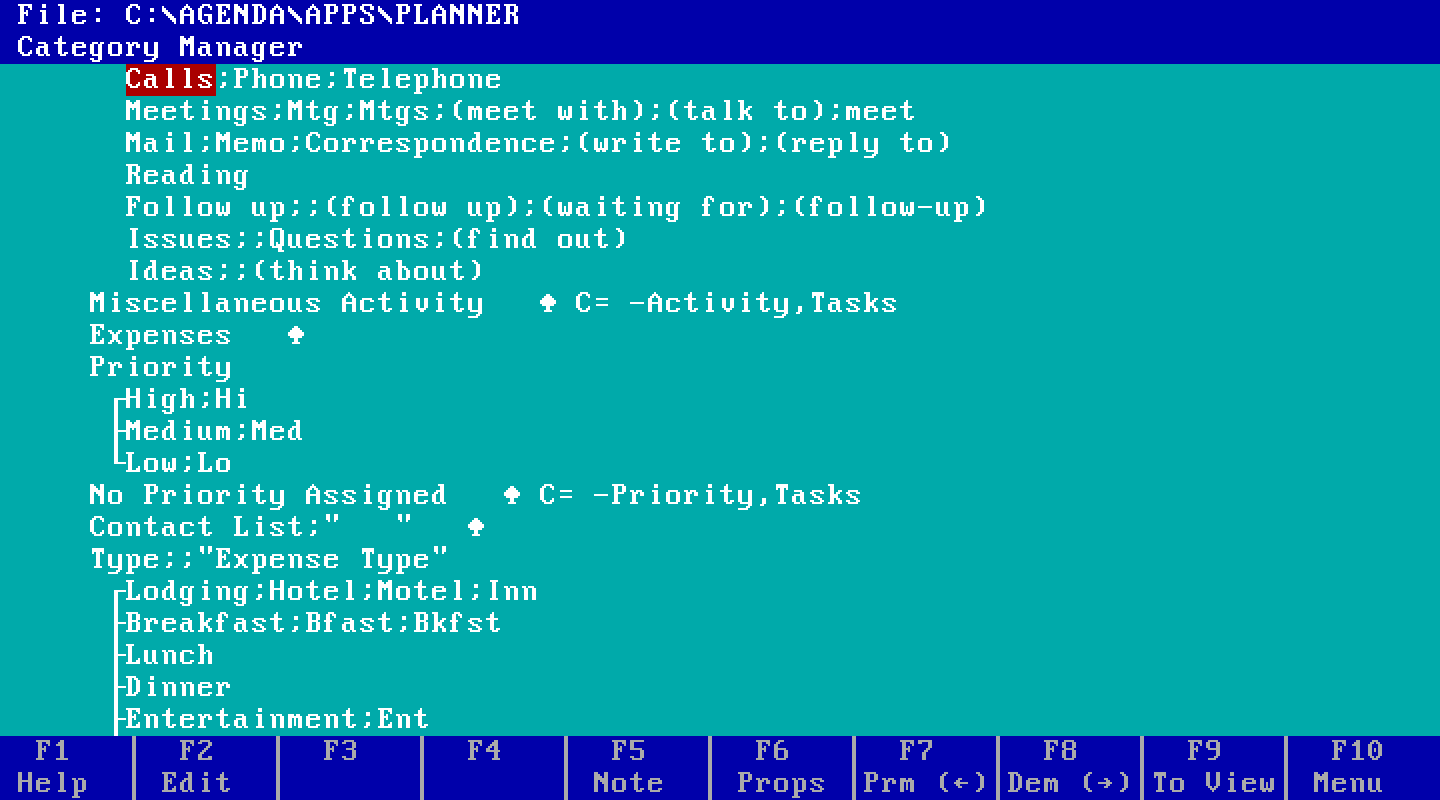
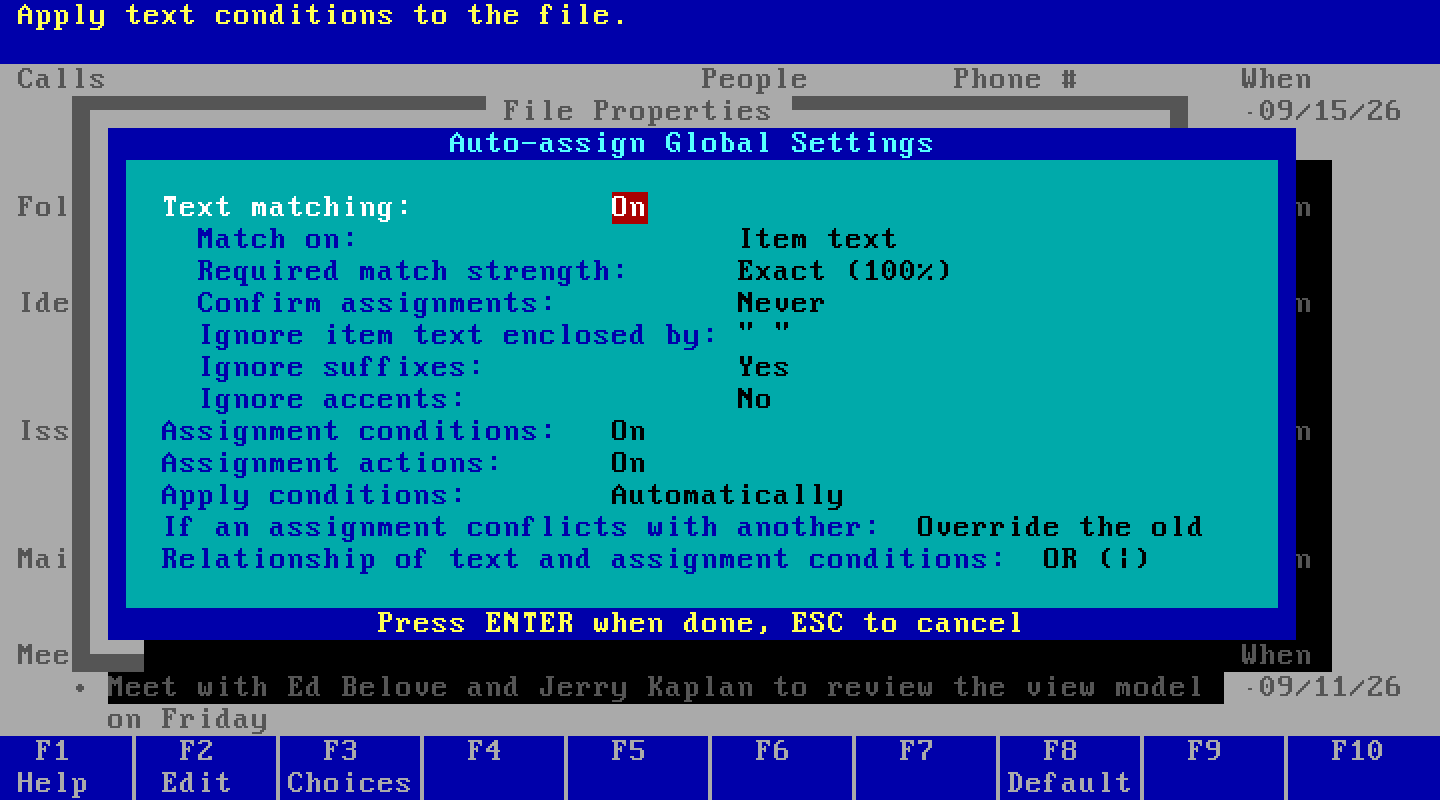
Two dials govern how aggressively this runs.
Initiative
How strong a match must be before the engine acts on it at all.
Authority
Whether a match is applied immediately, or queued as a guess for a human to confirm.
That second dial is the whole product. A filing system that acts on every guess is annoying. One that asks about every guess is useless. Agenda made the threshold a setting you control, and I'm claiming I can do that at least as well.
Update through views
Put an item in a section and it joins that section's category. Put it in a filtered view and Agenda runs the criteria backwards so the new item satisfies them. If the view shows items due next week, an item you type into it picks up a date next week.
This is where the 1990 paper stops. String matching is “beyond the scope of this article,” and update-through-views gets credited to unspecified “formal methods and heuristics.” The Users Guide fills in more of the first than I expected. Chapter 19 says how item text is cut into words, names, dates, and numbers, which suffixes get stripped, and that match strength is nothing fancier than the fraction of a category's words that appear in the item. It also documents a hook the paper never mentions: a category can refuse explicit assignments and then make items fit, assigning whatever its own condition requires. That's reverse inference, shipped as a setting.
Chapter 11 then gives the filter half, and it's plainer than the paper let on. Type an item into a view filtered by a category and it gets that category. Filtered by a date or number range, it gets the start of the range; filtered to outside a range, the value just before it. No formal methods, no heuristics: a rule.
That leaves the case the rule doesn't cover. A filter across an exclusive family
(High or Medium) admits an item that's in either, so which one does a new item
get? The manual doesn't say, and the paper's answer, look at the neighbouring items,
appears nowhere in it. So I asked the program, seven times. A new item copies the item
directly above it: below a Medium call it comes out Medium, below a High one it
comes out High, even when everything else in the view is Medium. With nothing above
it at all, it takes whichever filter was entered first, even with a High item sitting
directly beneath it. Not the last filter, not the most common, not the top of the tree,
not the one below: the one above. The manual never wrote it
down, but a Lotus support note from October 1990 did, almost word for word: check the
previous item in the view, and with none, take the first category. So did the patent
Lotus filed in November 1988, in the language of claims: resolve the ambiguity from
“data immediately adjacent to or preceding the data to be modified in the view.” The
patent adds that with nothing preceding, the following item “may be used”; the seventh
run says the shipped program didn't. I read both after the first six runs.
Agenda 2.0b runs under DOSBox Staging on my desk, and I can watch what it does instead of guessing. That answer took seven typed items and an assignment profile. Chandler never had that.
Two invariants I'm honoring on day one
Both are cheap now and expensive to retrofit later. Both come straight from the paper.
Storage does not depend on hierarchy
Changing the category tree must require no reformatting, no re-indexing, and no migration. The tree is allowed to keep changing, so nothing may be tied to its current shape.
No terminal / non-terminal distinction
An item can be assigned anywhere in the tree, including the root. There's no internal difference between a leaf category and a parent one.